Building a Better PS1 Mini from Classic Hardware
How original consoles, clever mods, and community tools can turn the PlayStation Classic into the PS1 mini it always should have been.
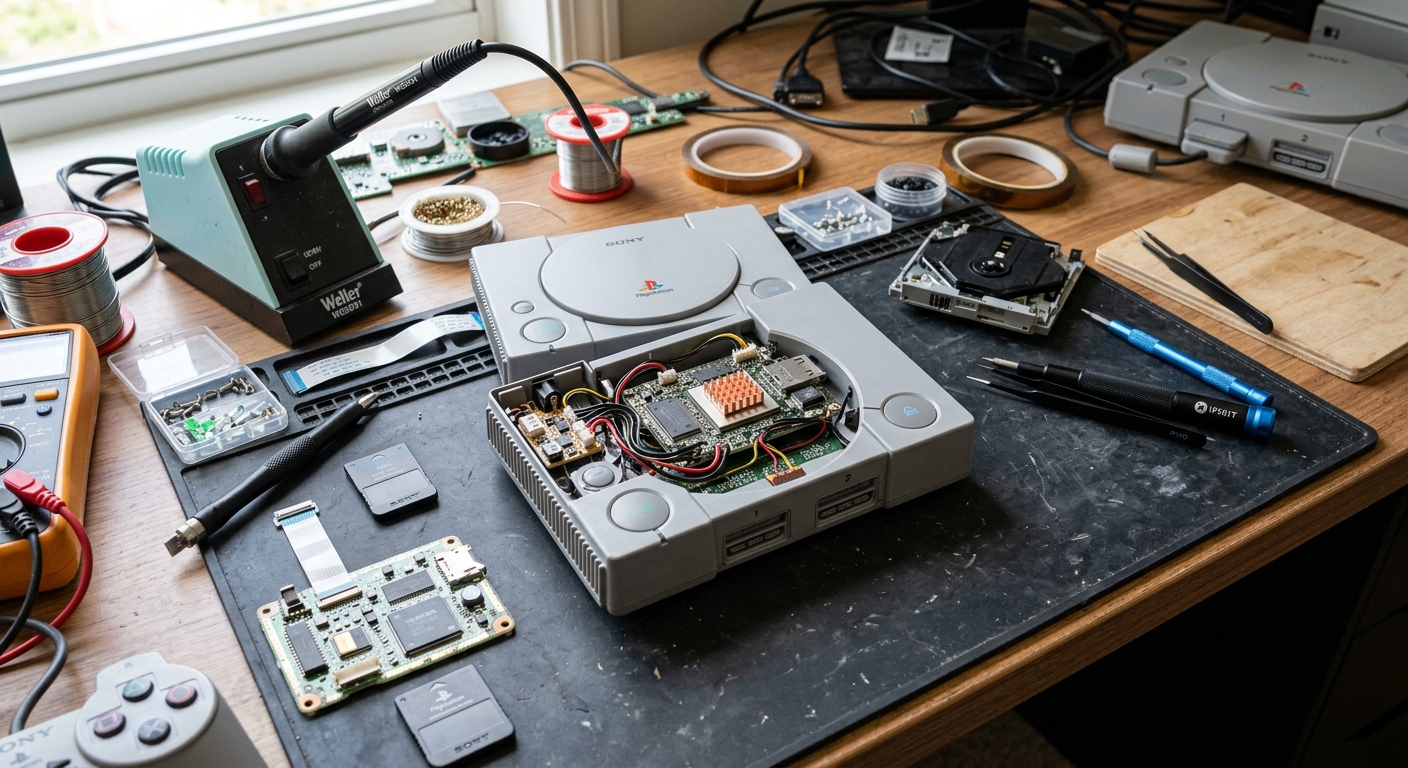
The PlayStation Classic arrived as Sony’s official tribute to the original PlayStation, promising a slick miniature shell and a curated selection of games. Yet many retro fans walked away disappointed by its game library, performance quirks, and limited features. With a bit of creativity, though, you can turn the PlayStation Classic into the PS1 mini people actually wanted—and even pair it with original Sony hardware for a more authentic, flexible setup.
This guide explores how enthusiasts combine the PlayStation Classic, original PlayStation consoles, and community-made software to build a compact, powerful PS1 mini system that outshines both the stock mini and, in some ways, the original hardware itself.
Why the PlayStation Classic Fell Short
Before diving into upgrades and mods, it helps to understand why the PlayStation Classic generated so much criticism at launch. Sony built an attractive, tiny console, but several design decisions held it back for serious retro fans.
Limited built-in game library
The PlayStation Classic released with 20 pre-installed titles spanning a range of genres. While some iconic games made the cut, others were conspicuously absent, leaving many players disappointed. By contrast, the original PlayStation library spans thousands of games, including region-specific favorites and cult classics. A fixed selection of 20 simply can’t reflect the depth of that catalog.
- No official way to add games: Out of the box, you’re locked into the bundled titles.
- Licensing constraints: Music rights, publisher deals, and brand issues likely shaped the lineup more than fan demand.
- Region oddities: Some territories received different titles, which sparked further debate among enthusiasts.
Emulation quality and performance complaints
The PlayStation Classic is essentially a small emulation box, not a miniaturized original PS1 motherboard. Sony opted to use an open-source emulator on modest hardware. That’s a perfectly valid approach, but the execution was uneven:
- Some games suffered from inconsistent performance and visual artifacts.
- PAL versions of certain titles were used in all regions, leading to lower refresh rates compared with their NTSC counterparts.
- Enthusiasts quickly discovered configuration tweaks that could significantly improve the experience—which made it obvious that the stock setup left performance on the table.
Missing quality-of-life features
Compared with many modern retro-style mini systems, the PlayStation Classic launched with a stripped-down feature set:
- No official rewind function or fast-forward options.
- No built-in way to manage custom save states beyond the original memory-card style system.
- No supported method to attach external storage or import your own disc images.
For casual nostalgia this might be enough, but for retro enthusiasts, these omissions were hard to ignore—especially given how capable the underlying hardware is once properly configured.
Why Original PS1 Hardware Still Matters
If the PlayStation Classic is fundamentally an emulator in a shell, the original PlayStation remains the pure hardware experience. Many fans still own one or more classic PS1 consoles, and they offer a few advantages that complement the mini.
Authentic feel and controller experience
The original PlayStation was designed around CRT displays and analog-era controllers. Plugging a genuine DualShock pad into a real console still feels different from routing everything through emulation. The physical memory cards, the mechanical disc drive sounds, and compatibility with original peripherals all contribute to a distinctive experience.
For players seeking authenticity, using original hardware ensures that games behave exactly as they were designed to, including niche quirks that emulation sometimes struggles with.
Original disc support and peripherals
While the PlayStation Classic focuses on digital ROMs, an original PS1 (or PSOne) allows you to:
- Play your original disc collection without ripping or converting them.
- Use accessories like the Multitap, light guns (with compatible displays), and specialized controllers.
- Connect over analog video outputs for a historically accurate look on CRTs.
These strengths make the original console a great partner to a modded PlayStation Classic, rather than a direct competitor.
Turning the PlayStation Classic into a True PS1 Mini
Despite its flawed launch, the PlayStation Classic has become a favorite platform for modders. With a softmod applied, it transforms from a locked-down collectible into a flexible emulation hub. Community projects such as Project Eris (previously known as BleemSync) are at the center of this transformation.
What a softmod actually does
A softmod doesn’t require soldering or permanent hardware changes. Instead, it uses software loaded from a USB drive to enhance or replace the default system menu and emulator configuration. When done correctly, it is reversible and generally low risk from a technical standpoint (though it may void warranty or violate terms of use).
Typical benefits of a well-known PlayStation Classic softmod include:
- Custom game loading from USB storage.
- Improved emulator performance and configuration options.
- Support for additional emulators beyond PS1.
- Feature-rich front-end menus with cover art and metadata.
Essential hardware for upgrading the Classic
Before installing any mod, you’ll need a few pieces of basic hardware to make the process smooth and reliable:
| Item | Purpose | Tips |
|---|---|---|
| USB flash drive | Stores the mod files and your game images | Use a reputable brand and format it as recommended by the mod documentation. |
| OTG (On-The-Go) cable | Lets you power the console and connect USB storage through the rear port | Look for a cable with a micro-USB plug and a full-size USB-A port. |
| Reliable power supply | Ensures stable power during installation and gameplay | A phone charger from a major brand often works better than TV USB ports. |
| Computer | Used for downloading the mod and managing game files | Follow checksum or integrity checks provided by the mod project. |
High-level installation overview
Every mod platform has its own detailed guide, and you should always follow the official instructions, but the general flow looks like this:
- Download the latest stable release of your chosen mod from its official project site.
- Format your USB drive according to the instructions (often FAT32 or exFAT).
- Extract the mod files onto the root of the USB drive.
- Attach the USB drive to the OTG cable, connect power, and boot the PlayStation Classic.
- Follow on-screen or documented steps to allow the installer to patch the system.
- After installation, use the same or a separate USB drive to store and run your game images.
The result is a PlayStation Classic that behaves more like a small, open emulation box than a fixed-function miniature console.
Building a Hybrid Setup: Best of Mini and Original
The real magic happens when you combine a modded PlayStation Classic with original PS1 hardware. Each device fills gaps the other leaves open. Instead of choosing between them, you can treat them as complementary pieces in a retro gaming setup.
Mini for convenience, original for authenticity
With a softmod applied, the PlayStation Classic excels at convenience and flexibility:
- Quick access to your library: Your favorite games are only a few menu clicks away.
- Save states and fast loading: You can jump in and out of play sessions without juggling physical memory cards.
- Multiple display options: You can easily connect to modern TVs over HDMI.
Meanwhile, the original PlayStation remains your go-to for:
- Playing original discs exactly as intended.
- Using specialized controllers and peripherals.
- Experiencing the games with period-appropriate hardware, especially on CRT displays.
Many enthusiasts keep both consoles connected and select between them depending on the game or mood.
Storage vs. disc-based play
One of the biggest practical differences between the two consoles is storage medium:
- A modded Classic loads games from digital images stored on USB drives or similar media.
- An original PS1 uses optical discs, which can wear over time and need careful handling.
By offloading day-to-day play to your modded mini, you can preserve your original discs. If you’re careful and respect local laws, you can back up discs you own and use those images on the Classic while keeping the originals safely stored.
Managing ROMs and Staying on the Right Side of the Law
Whenever you talk about adding games to a mini console, the topic of ROMs and legality inevitably comes up. Emulation itself is legal in many jurisdictions, but distributing copyrighted game images without permission is not. Some publishers have taken firm positions on unauthorized ROM sharing, pursuing legal action when necessary.1
General best practices
This is not legal advice, but there are widely accepted guidelines many retro fans follow:
- Only use disc images created from game discs you personally own.
- Do not download or share commercial game images from unlicensed sources.
- Keep backups for personal use rather than distribution.
- Respect license terms for homebrew and open-source titles you load onto your device.
If you’re unsure about what’s allowed in your region, consult local laws or seek professional legal guidance.
Organizing your library
Once you have lawful disc images, the way you organize them can make your modded mini far easier to use. Many front-ends support:
- Per-system folders (PS1, arcade, etc.).
- Sub-folders sorted by genre, publisher, or release year.
- Metadata such as cover art, descriptions, and ratings.
A bit of upfront curation pays off when your library grows beyond a handful of games.
How the Modding Community Rescued the PlayStation Classic
The PlayStation Classic’s evolution mirrors a broader trend in retro gaming: officially released mini systems often become much more capable once the community gets involved. Dedicated developers document the hardware, experiment with software, and release tools that extend what the device can do.
From disappointing launch to versatile emulation box
At launch, reviewers and early buyers criticized the Classic’s game list and performance. Over time, mod projects emerged that:
- Improved emulator configuration and performance.
- Enabled custom game libraries and multiple regional versions.
- Added support for other retro systems beyond PS1.
The result is that the same hardware, when configured differently, can feel like an entirely new product—much closer to what many fans expected in the first place.
Learning from other mini consoles
The PlayStation Classic is not alone. Previous devices such as Nintendo’s NES and SNES Classic Editions were also quickly analyzed by enthusiasts, who found ways to expand their libraries and functionality. Official communications from companies like Nintendo and Sony tend to focus on the curated, legal experience, but they also highlight the popularity of retro gaming and the demand for well-executed nostalgia hardware.2,3
Those trends helped create a market where modders and official manufacturers coexist, even if they sometimes pull in different directions regarding openness and customization.
Practical Tips for Building Your Ideal PS1 Mini Setup
If you want to build a setup that combines the strengths of the PlayStation Classic and original PS1 consoles, keep these practical pointers in mind.
Plan your physical layout
- Reserve HDMI inputs on your TV or AV receiver for the PlayStation Classic and other modern systems.
- Use composite or component inputs (or a quality upscaler) for the original PS1 if you want a more authentic visual output.
- Label controllers and cables so you can quickly switch between consoles.
Balance convenience and preservation
A reasonable approach is to treat the PlayStation Classic as your everyday play device and the original console as your archival or “special occasion” machine. That way, you:
- Reduce wear on aging optical drives.
- Keep your rare or sentimental discs safe from scratches.
- Still enjoy the tactile experience of original hardware when you’re in the mood.
Stay informed and keep backups
- Follow official documentation for your chosen mod platform to stay updated on new releases and bug fixes.
- Back up your USB drives and configuration files in case of corruption or hardware failure.
- Keep a record of which game images came from which discs, so you can recreate your library if needed.
Frequently Asked Questions
Does modding the PlayStation Classic damage the console?
Most popular softmods are designed to be reversible and non-destructive. They use software loaded from external storage and do not require soldering. However, there’s always some risk when altering system software, and you may void your warranty. Follow official documentation carefully and understand the risks before proceeding.
Can a modded PlayStation Classic fully replace an original PS1?
Functionally, a modded Classic can play many of the same games and often adds conveniences like save states and HDMI output. But it cannot fully replicate the behavior of original hardware, especially when it comes to certain peripherals, CRT-friendly features, or edge-case compatibility. Many enthusiasts treat the two consoles as complements rather than replacements.
Is emulation legal?
Emulation itself (running software that imitates console hardware) is generally legal in many regions, but downloading or distributing copyrighted game images without permission is not. You should only use disc images that you are legally entitled to use, such as backups of discs you own, and avoid unauthorized ROM sites. If in doubt, check your local laws or consult a legal professional.
Can I play other systems on the PlayStation Classic after modding?
Many mod platforms add support for emulating additional retro systems beyond the PS1, depending on the hardware’s capabilities. Performance varies depending on the complexity of the system being emulated and the quality of emulator optimization. Consult the documentation for your chosen mod to see which platforms are supported.
Is the PlayStation Classic still worth buying today?
As a stock product, the PlayStation Classic is mostly a collectible with a small library. For enthusiasts willing to explore softmods, it becomes a compact, versatile emulation device that can nicely complement original PS1 hardware. Availability and price will vary by region and over time, so consider the total cost including USB storage, OTG cable, and a reliable power supply.
Conclusion: The PS1 Mini We Wanted All Along
On its own, the PlayStation Classic is an attractive but limited nostalgia piece. Once the community stepped in, it evolved into something far more exciting: a customizable mini console that can host a broad PS1 library, add modern conveniences, and integrate neatly into a broader retro gaming setup.
By pairing a modded PlayStation Classic with original PS1 hardware, you don’t have to choose between authenticity and convenience. Use the original console when you want the exact feel and behavior of 1990s hardware, and turn to the Classic when you want fast access, flexible storage, and a compact HDMI-friendly box. Managed thoughtfully and within the bounds of local law, the result is a PS1 mini experience that not only outperforms the official mini console, but in many ways complements and extends the legacy of the original PlayStation itself.
References
- Legal Information Regarding ROMs and Emulation — Nintendo of America. 2019-07-19. https://www.nintendo.com/corp/legal.jsp
- PlayStation Classic: The (Miniature) Ultimate FAQ — Sony Interactive Entertainment. 2018-11-26. https://blog.playstation.com/2018/11/26/playstation-classic-the-miniature-ultimate-faq/
- PlayStation Classic Product Page — Sony Interactive Entertainment. 2018-12-03. https://www.playstation.com/en-us/consoles/playstation-classic/
- NES Classic Edition — Nintendo of America. 2016-11-11. https://www.nintendo.com/nes-classic/
- SNES Classic Edition — Nintendo of America. 2017-09-29. https://www.nintendo.com/super-nes-classic/
Similar Articles







Read full bio of Sneha Tete