Essential PS5 Accessories: Build Your Ultimate Setup
From controllers to SSDs and headsets, this guide walks you through building a PS5 setup that’s faster, more comfortable, and more immersive.
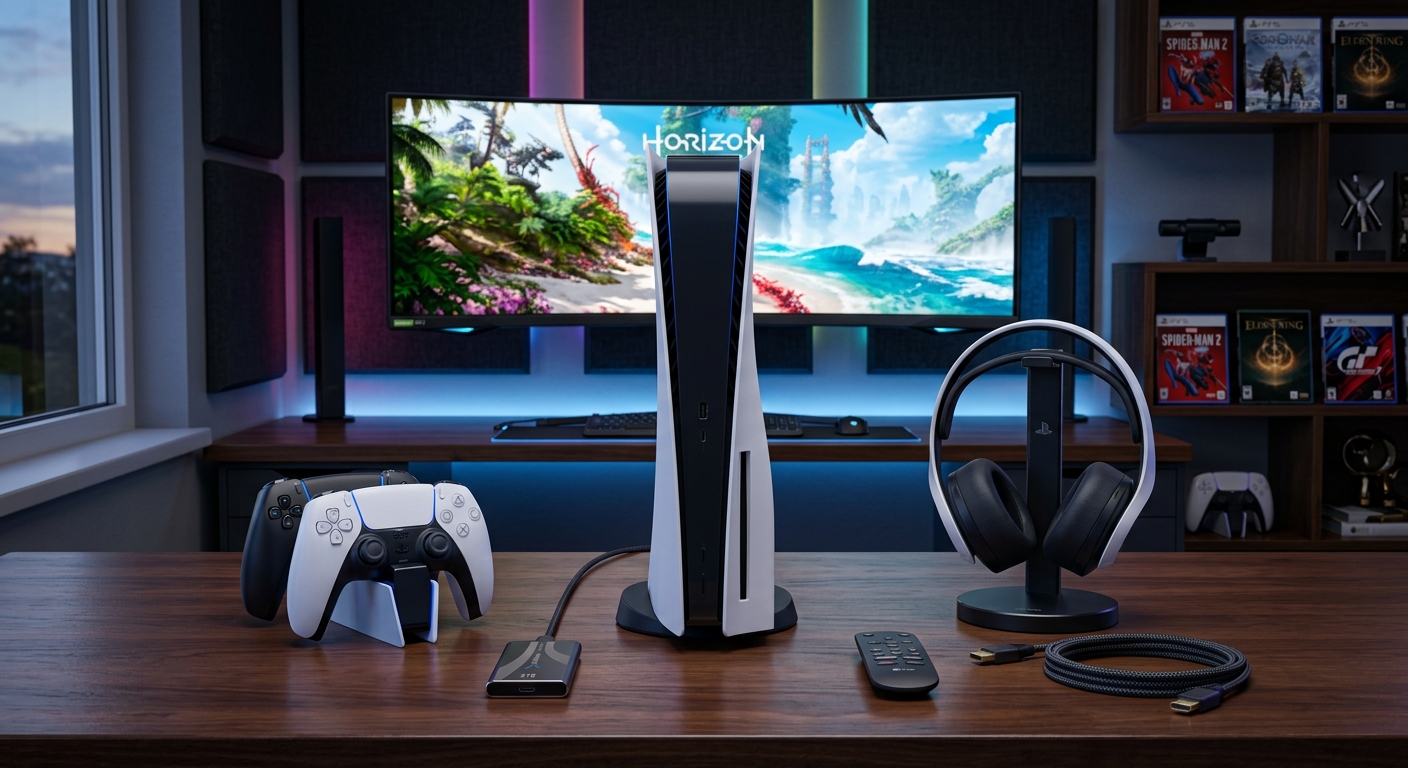
The PlayStation 5 is powerful on its own, but the right accessories can completely transform how it feels to play. Better controllers can sharpen your aim, a quality headset changes the way you read the battlefield, and a fast SSD means less time watching loading screens and more time actually gaming.
This guide pulls together the most useful categories of PS5 accessories and explains what they do, who they suit, and how to avoid wasting money on gimmicks. Use it as a blueprint to build an ultimate PS5 kit tailored to the way you play.
How to Prioritize PS5 Accessories
Before diving into specific categories, it helps to rank what matters most for your own setup. Not every player needs a tournament-grade controller or a broadcast-quality microphone.
Questions to Ask Before You Buy
- What do you play most? Fast shooters, story-driven RPGs, sports, and fighting games all benefit from different upgrades.
- Where do you play? A living room TV, a small desk monitor, and a shared household all change which accessories are practical.
- Who do you play with? Solo players prioritize audio and comfort; local multiplayer players often need extra controllers and charging gear.
- What is your budget? Some categories, like headsets and SSDs, scale up heavily in price. Decide where you’re happy to invest.
Core vs. Nice-to-Have Gear
For most players, PS5 accessories fall into two broad buckets:
- Core essentials: A comfortable controller, reliable headset, extra storage, and a basic charging solution.
- Extras: Specialized fight sticks, racing wheels, dedicated remotes, and streaming gear.
Start with the essentials, then add niche accessories once you know they’ll actually see regular use.
Controllers: The Heart of Your PS5 Experience
The DualSense controller already delivers advanced haptics and adaptive triggers that developers use to enhance gameplay. Still, you may want a backup pad, a more competitive layout, or an option for different hand sizes.
When the Standard DualSense Is Enough
A stock DualSense will suit most people, especially if you mainly play single-player titles. Features include:
- Adaptive triggers that can simulate resistance (e.g., drawing a bowstring)
- Fine-grained haptic feedback tied closely to in-game actions
- Built-in microphone and speaker for quick chat or system navigation
Sony’s controller documentation explains that many games are specifically tuned to this feature set, so sticking with the original pad keeps you aligned with the platform’s design vision.1
Why Consider a Pro or Third-Party Controller
If you play a lot of shooters, fighting games, or competitive titles, you might benefit from additional features:
- Rear paddles: Map jump, reload, or melee to paddles so you can keep thumbs on the sticks.
- Swappable thumbsticks: Different heights and shapes can improve control or comfort.
- Trigger locks: Shorten trigger travel to speed up firing in shooters.
- Custom profiles: Save sensitivity and button layouts for individual games.
Many modern PS5-compatible pro controllers support both wired low-latency connections and wireless modes, so you can choose between absolute responsiveness and convenience.
Extra Controllers for Local Multiplayer
Local co-op and party games remain a big part of console gaming. If you regularly play with friends or family, consider:
- Buying at least one extra DualSense or compatible controller
- Add-ons like silicone grips or stick caps to help identify each player’s controller quickly
- Having a charging dock that holds two to four pads at once
For households with kids, durability and easier cleaning can matter more than advanced features, so prioritize sturdy build quality and replaceable thumbstick caps over high-end tunables.
Audio: Headsets and Sound for Immersion and Communication
Audio is one of the biggest upgrades you can make to a PS5 setup. Sony’s Tempest 3D AudioTech allows games to place sounds in a virtual 3D space around you, improving immersion and positional awareness.2 A good headset is the easiest way to experience this consistently.
Choosing a PS5 Headset
Key things to look for in a headset that pairs well with PS5:
- Compatibility: Make sure it supports PlayStation’s 3D audio over USB or the controller’s 3.5mm jack.
- Comfort: Look for cushioned headbands, memory foam ear cups, and adjustable sizing, especially for long sessions.
- Microphone quality: Clear voice pickup and noise reduction help with team communication.
- Battery life (for wireless): Aim for at least 15–20 hours on a single charge.
Wireless vs. Wired for PS5
Both wired and wireless options have pros and cons:
| Type | Pros | Cons |
|---|---|---|
| Wireless |
|
|
| Wired |
|
|
When to Consider Speakers or Soundbars
If you play mainly single-player games or share your gaming space with others, a soundbar or home theater system can be more comfortable than a headset. Look for:
- HDMI ARC/eARC compatibility with your TV
- Support for surround formats like Dolby Atmos (if your display and PS5 setup are configured to pass them through)
- Dialogue enhancement modes for story-heavy games
Sony’s official guidance notes that 3D audio is primarily tuned for headphones, but TV and speaker support has been expanding via system updates, giving you more options over time.2
Storage: Expanding Your PS5 Library
Modern PS5 titles can easily exceed 80–100GB each, and big live service games grow with every patch. Internal SSD expansion is the best way to manage a large library without constantly deleting and re-downloading games.
Internal SSD Expansion Basics
The PS5 includes an internal M.2 slot for NVMe SSDs that meet specific performance and size requirements. Sony’s support documentation notes that drives should be PCIe Gen4 with a minimum sequential read speed of 5,500MB/s, and you must attach a heatsink for adequate cooling.3
Key Specs to Check
- Interface: PCIe Gen4 x4 NVMe
- Capacity: 1TB is a strong baseline; 2TB is ideal for big libraries.
- Heatsink height: Must fit within the PS5’s M.2 bay dimensions.
- Rated speeds: Look for 5,500MB/s or higher read speeds.
Installation involves removing the PS5 side panel, unscrewing the M.2 bay cover, inserting and securing the SSD, then formatting it via the console’s storage menu.
External Drives: What They’re Good For
USB external drives cannot run native PS5 titles directly, but they remain useful as cold storage and for PS4 games:
- Archive PS5 games you’re not currently playing, to avoid re-downloading them
- Run PS4 titles directly from external HDD or SSD
- Move games between systems without saturating your internet bandwidth
Sony’s external storage guidelines clarify that only USB drives meeting certain speed and capacity requirements are supported for game storage.4
Charging Solutions and Power Management
Few things ruin a big session like a dead controller. The PS5’s USB ports can charge pads directly, but dedicated charging accessories add convenience and keep your setup tidy.
Charging Docks and Stands
A well-designed charging dock should:
- Hold at least two controllers
- Offer clear charge status indicators
- Use the bottom charging contacts or USB-C, not fragile micro-USB adapters
- Have a stable base that won’t tip when you dock or undock controllers
Combination stands can hold the PS5 console vertically, dock controllers, and sometimes integrate a cooling fan. If you opt for one, ensure it doesn’t obstruct the console’s air vents and doesn’t require questionable modifications to the console’s casing.
Battery Health Tips
Lithium-ion batteries degrade over time, but you can prolong controller life with a few habits based on general battery guidance from major electronics manufacturers:
- Avoid leaving controllers at 0% charge for long periods.
- Don’t store them in very hot or very cold environments.
- Regularly top them up instead of only charging from completely empty.
These practices align with broader battery care principles documented by companies such as Apple and others in their support materials, even though they’re not specific to PS5 controllers.5
Media, Remote Play, and Living Room Convenience
For many households, the PS5 doubles as the main media box for streaming movies and TV. Accessories that streamline this experience are particularly useful in shared living rooms.
Media Remotes and TV Control
A dedicated media remote lets you navigate streaming apps without waking a controller. Features to consider:
- Built-in PS5-specific buttons for home, menu, and playback controls
- Dedicated buttons for popular streaming services, if you use them often
- Infrared or HDMI-CEC support to control your TV’s volume and power
HDMI-CEC, supported by the PS5, can allow your console to turn your TV on or off and switch inputs automatically, depending on your television’s settings.
Remote Play Accessories
PS Remote Play lets you stream PS5 games to other devices within your home network, and certain official devices are designed specifically for this purpose.6 Consider:
- Mobile controller grips or clips that hold a phone above a DualSense
- Dedicated handheld remote play devices for rooms where a TV isn’t practical
- Headsets or earbuds that easily pair with both your PS5 and your mobile device
A solid wireless network is critical for Remote Play. If you experience stuttering or latency, upgrading your router or using wired connections where possible can have a bigger impact than any individual accessory.
Specialized Gear: Wheels, Sticks, and Niche Tools
Once you’ve covered the basics, specialized controllers can dramatically improve specific genres.
Racing Wheels and Pedals
Sim racing fans benefit enormously from a wheel-and-pedal setup:
- Force feedback wheels can simulate tire slip, road texture, and car weight.
- Sturdy pedals allow for more precise throttle and brake control.
- Wheel stands prevent wobble and protect furniture.
Check for official PS5 compatibility and ensure the wheel supports the force feedback modes used by your favorite racing games.
Fight Sticks and Arcade Pads
For 2D fighters and arcade-style games, an arcade stick can feel more responsive and natural than a standard controller. Look for:
- Authentic arcade-quality buttons and sticks
- Button layouts that match your preferred fighting series
- The ability to customize art, buttons, and stick tops
Tournament players may also care about input lag and whether a particular stick is accepted at competitive events, so check community recommendations if you plan to compete.
Accessibility-Focused Hardware
Accessible controllers and input devices are increasingly important. Official and third-party solutions offer modular controls, large buttons, and flexible mounting systems to accommodate various physical needs. Sony has introduced dedicated accessibility hardware and expanded system-level access features to support these setups.7
If accessibility is a priority, look for controller systems that offer:
- Button remapping and profile saving
- Support for external switches and alternative inputs
- Clear documentation on PS5 compatibility
Streaming and Content Creation Add-Ons
If you stream or create content, you’ll want to consider accessories that improve visuals and audio for your audience.
Cameras
A PS5-compatible camera allows you to add facecam overlays to broadcasts. Prioritize:
- Resolutions of at least 1080p with decent low-light performance
- A compact form factor that sits easily on a TV or monitor
- Simple integration with the PS5’s broadcast tools
Microphones and Audio Interfaces
While a headset mic may suffice, dedicated microphones elevate stream quality:
- USB microphones are plug-and-play and simple to position.
- XLR mics with an interface give more control but are more complex.
- Pop filters and boom arms help with comfort and clarity.
For more advanced setups, some streamers utilize capture cards and PCs to manage overlays, alerts, and chat, but that moves beyond PS5 accessories into full production rigs.
Frequently Asked Questions
Do I really need a second SSD for my PS5?
If you only rotate a handful of games, you may be fine with the internal storage. If you like having a large library installed simultaneously or frequently play large live-service titles, adding a 1TB–2TB M.2 SSD is one of the most impactful upgrades you can make.
Can any gaming headset use PS5 3D audio?
Most stereo headsets connected via the controller’s 3.5mm jack or a compatible USB dongle can make use of PS5’s 3D audio processing. However, some official or licensed headsets are specifically tuned for this feature and may provide better overall sound balance.
Are vertical console stands safe for the PS5?
The PS5 can operate both horizontally and vertically. Third-party stands are generally safe if they don’t obstruct the console’s vents or force it into an unstable position. Avoid stands that require permanent modifications or block airflow.
Is a pro controller worth it for casual players?
For mostly single-player or casual multiplayer gaming, a standard DualSense is usually enough. Pro controllers make the biggest difference for competitive players who value paddles, trigger locks, and fine-grained tuning.
Which accessory should I upgrade first on a tight budget?
Most players see the biggest immediate benefit from a good headset or an internal SSD, depending on which pain point is worse for you: poor audio or constant storage management. If you play a lot of online games, prioritize audio first.
Building the Right PS5 Kit for You
There is no single “perfect” PS5 accessory list that fits everyone. A solo story-focused player will want a strong headset and a big SSD; a local multiplayer household might care more about extra controllers and charging docks; a competitive gamer may prioritize a pro pad and a low-latency display.
Start by tightening your basics: a comfortable controller, reliable audio, adequate storage, and simple charging. Then expand into niche accessories that support your favorite genres and play style. A carefully chosen PS5 kit doesn’t just look impressive on a shelf—it reduces friction, increases comfort, and lets you focus on what actually matters: playing great games.
References
- DualSense wireless controller support — Sony Interactive Entertainment. 2023-08-09. https://www.playstation.com/en-us/support/hardware/dualsense-wireless-controller/
- PS5: About 3D audio — Sony Interactive Entertainment. 2023-09-06. https://www.playstation.com/en-us/support/games/ps5-3d-audio/
- PS5: M.2 SSD storage requirements — Sony Interactive Entertainment. 2024-01-17. https://www.playstation.com/en-us/support/hardware/ps5-install-m2-ssd/
- PS5: USB extended storage requirements — Sony Interactive Entertainment. 2023-11-15. https://www.playstation.com/en-us/support/hardware/ps5-extended-storage/
- Maximizing Battery Lifespan — Apple Inc. 2023-10-05. https://www.apple.com/batteries/maximizing-performance/
- PS Remote Play — Sony Interactive Entertainment. 2024-02-01. https://www.playstation.com/en-us/remote-play/
- Access controller for PS5 console — Sony Interactive Entertainment. 2024-01-10. https://www.playstation.com/en-us/accessories/access-controller/
Similar Articles








Read full bio of Sneha Tete