Minecraft Herdcraft Snapshot Turns Items Into Your Personal Army
Mojang’s Herdcraft snapshot replaces your inventory with a roaming herd of items you can command, craft with, and send into battle.
Minecraft’s annual April Fools snapshot has become a tradition: once a year, Mojang pulls a wild design idea out of its back pocket and ships a fully playable experiment that twists the survival sandbox into something bizarre and surprisingly smart. The Herdcraft snapshot is one of the most radical of these joke updates so far, because it aims directly at a pain point players have complained about for years: inventory management.
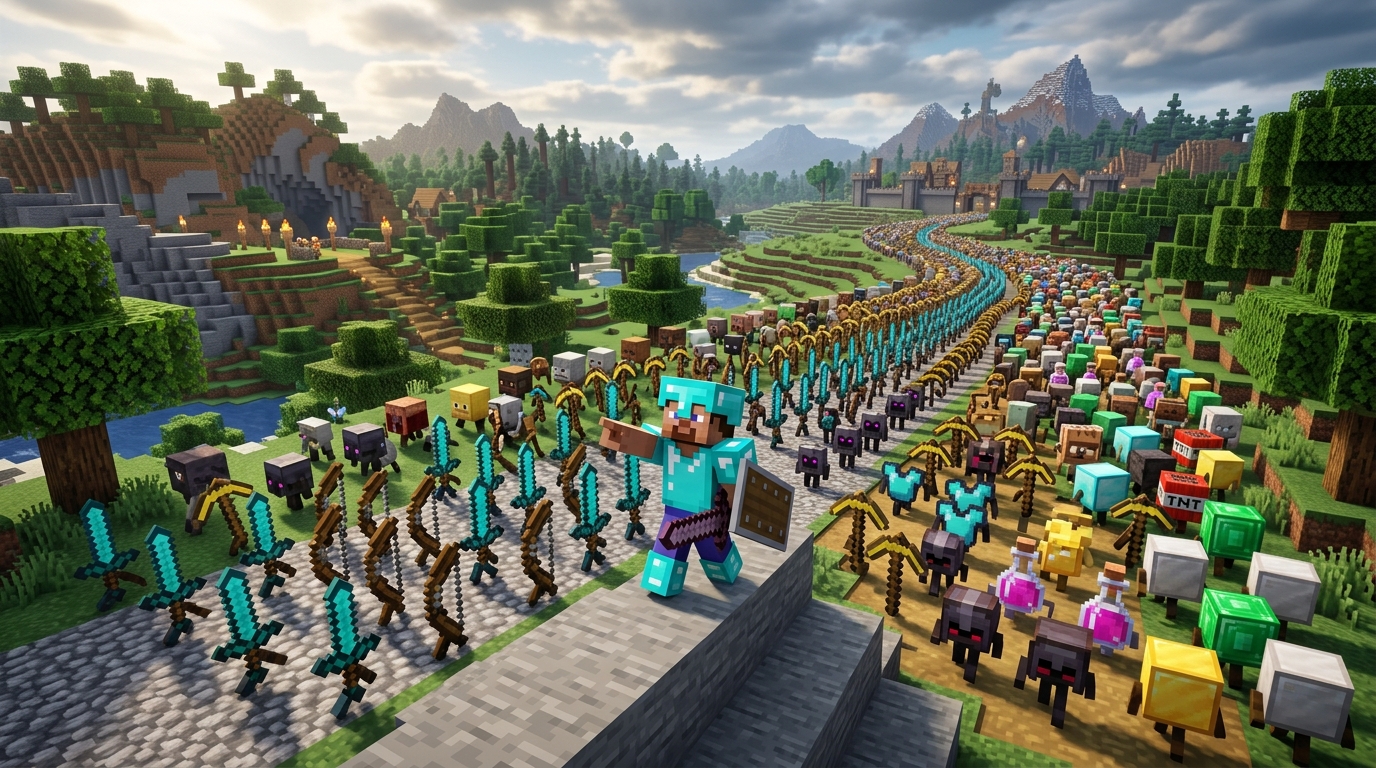
Instead of offering a few extra slots or another type of chest, Herdcraft goes completely in the opposite direction. It removes your inventory outright and turns every block and item you own into a physical follower that trails behind you, obeys your commands and even fights your battles. The result feels like a crossover between Minecraft, a pet simulator, and a real‑time strategy game.
What Is Herdcraft and How Do You Access It?
Herdcraft is an April Fools snapshot released for Minecraft: Java Edition. Snapshot builds are experimental versions of the game that Mojang uses to test upcoming features — and sometimes, as in this case, to release time‑limited joke updates. These snapshots run alongside the main game so your regular worlds are safe.
According to Mojang’s official snapshot notes, Herdcraft is designed as a complete rethinking of inventory handling, not a small tweak. Once you start a world in this snapshot, the normal inventory bar is gone. Instead, every item you obtain will live in the world as a companion entity that can follow you, be moved around, and be ordered to perform tasks.1
How to install the Herdcraft snapshot
You can access Herdcraft from the standard Minecraft Launcher on PC:
- Open the Minecraft Launcher.
- Go to the Installations tab.
- Enable Snapshots so experimental versions are visible.
- Create or select the profile marked Latest Snapshot (corresponding to the Herdcraft build) and launch.
- Create a new world and start playing with the new mechanics.
Mojang recommends backing up existing worlds before playing snapshots, because these experimental versions can sometimes introduce bugs or compatibility issues when opened in newer releases later on.1
The Big Twist: The World Becomes Your Inventory
The core idea behind Herdcraft is summed up by Mojang’s own description: the inventory is removed, and the world itself becomes your inventory.1 In practice, that means every resource you gather manifests as an object in the environment rather than a neat stack of items hidden in a menu.
Breaking blocks no longer drops items
When you break a block in Herdcraft, you don’t pick up an item. Instead, the block’s “spirit” is separated from the world, becoming a kind of tameable entity. The physical block disappears, but its animated stand‑in now lingers nearby, ready to be enlisted into your herd.
Your early game might look like this:
- Mine a tree, and the logs transform into log companions hopping on the ground.
- Break stone, and pebble‑like stone entities join them.
- Collecting ores, dirt, and other blocks quickly fills the landscape with a chaotic train of followers.
These entities do not automatically jump into a hotbar; you have to interact with them using special commands. It forces you to be physically aware of your resources and where they are in the world.
Command reactions replace classic item slots
In place of a classic hotbar of tools and blocks, Herdcraft gives you a set of reaction icons. These act like commands in a strategy game:
- Follow – leash specific items or blocks so they trail behind you.
- Move – order a block entity to roll or slide to a targeted spot.
- Craft – assign items to crafting positions on the ground to form recipes.
- Attack – send items and blocks charging toward enemies.
- Highlight – briefly outline your herd so you can find hidden or buried members.
Right‑clicking with one of these reactions generally selects a target, and left‑clicking confirms the command, though exact controls can be adjusted like any other Minecraft input. The important point is that you’re no longer equipping a sword or pickaxe the normal way — you’re orchestrating a crowd.
Living With a Sentient Inventory
Playing Herdcraft means learning to navigate the world with a pack of items on your heels. This drastically changes how you think about exploration, building, and combat.
Mobility: adventuring with a growing trail of stuff
In standard Minecraft, the number of items you carry is constrained by slots, stack sizes, and shulker box space. In Herdcraft, your limit is more practical and physical: how much chaos you can tolerate trailing behind you.
As you mine and chop, your herd grows:
- Wood, stone, ores, and tools roll or float along behind the player.
- Dense areas, tight caves, or narrow bridges become harder to traverse when dozens of items are jostling around you.
- Because they’re physical entities, your belongings can get stuck, fall off ledges, or become separated from you.
This design intentionally surfaces the hidden cost of hoarding. Instead of silently stacking 37 different block types in your inventory, you are confronted with the sprawl of your possessions on screen, which can push you to curate what you keep nearby.
Storage and organization in a world without slots
Chests, barrels, and other containers still matter, but they interact with Herdcraft’s rules in new ways. When certain item entities roam close to a chest, they can be “scooped up” and stored, giving you a way to reclaim some order from the chaos.
Useful organization tactics include:
- Base corral: Build fenced pens or walled courtyards at home where you keep different sets of items.
- Specialized herds: Maintain separate groups of blocks and tools for mining, building, and combat.
- Chest magnets: Place chests in high‑traffic spots so stray items are more likely to be captured and stored.
Instead of page after page of chest GUIs, you’ll often visually recognize where your resources live in the world, because you literally see them milling around their usual spots.
Crafting on the Ground: From GUI to Physical Layout
Crafting in Herdcraft abandons the familiar 3×3 interface. To make anything more complex than a basic tool, you place a crafting grid as a block in the world, then command your item entities into the correct positions.
| Feature | Classic Minecraft | Herdcraft Snapshot |
|---|---|---|
| Interface | 2×2 or 3×3 grid inside an inventory menu | Physical grid on the ground in the game world |
| Item handling | Drag items from slots into recipe positions | Use commands to move item entities into grid cells |
| Feedback | Result preview in UI | Result appears as a new entity or block when recipe is complete |
| Immersion | Abstracted crafting menu separate from the world | Crafting takes place visibly in the environment |
This approach feels slower at first, but it reinforces the theme of Herdcraft: everything happens in the world, not in a hidden interface. You might set up dedicated crafting corners at your base, with enough free space to shuffle items around comfortably.
Automated combos and emergent recipes
Because items exist as mobile companions, some interactions become more dynamic. For example, when the right entities are brought close together in specific arrangements, the world can respond automatically by forming structures or activating logic the way traditional crafting or portal formation would.
This turns spatial proximity into a kind of recipe language: instead of remembering crafting screen patterns, you learn to place and move your herd cleverly in relation to key blocks like portals, crafting grids, and chests.
Combat With a Herd of Weapons
Combat is where Herdcraft feels most like playing a strategy or summoner‑style game. You don’t just hit monsters with a sword — you command an armory of swords, bows, and blocks that swarm your target on cue.
Issuing attack commands
When you activate the attack reaction and target a mob or location:
- Equipped weapons in your herd (such as swords) surge toward the target.
- Other items and blocks may follow, slamming into enemies or acting as moving shields.
- You can designate multiple waves of attacks by repeatedly targeting points or enemies.
Positioning suddenly matters much more than in regular Minecraft combat. If your items are scattered or stuck behind terrain, your offensive options are limited. Keep your army clustered and ready, and you can shred hostile mobs without swinging a single weapon yourself.
Defensive strategies with blocks
Blocks in your herd can serve as mobile cover:
- Use the move command to roll blocks into choke points where mobs are approaching.
- Build impromptu barricades by ordering blocks to line up around you.
- Reposition valuable items behind walls so they’re not exposed to creeper blasts.
This level of moment‑to‑moment control over the environment is rare in the base game, and it hints at how far Mojang could push more tactical combat if it wanted to explore these ideas beyond an April Fools snapshot.
Why an April Fools Snapshot Matters
On the surface, Herdcraft is a playful, temporary experiment. Underneath, it offers a prototype for solving a long‑running community complaint: the complexity of the inventory system as Minecraft has grown more feature‑rich. Even Mojang has acknowledged that managing the ever‑increasing number of blocks, tools, and items has become a challenge for design.1
Snapshot experiments like Herdcraft are valuable because:
- They allow Mojang to test extreme ideas without committing them to the main game.
- They gather feedback on what players love or hate in a low‑risk setting.
- They surface UX problems in a playful way, which can guide more realistic feature updates later.
Previous April Fools snapshots have introduced entirely new mechanics and perspectives that never made it into vanilla Minecraft, but parts of those experiments informed future changes. Herdcraft’s world‑as‑inventory concept may never arrive verbatim in the main game, yet it spotlights the tension between simplicity and depth that Mojang has to navigate when refreshing core systems.
Tips for Enjoying Herdcraft Without Losing Your Mind
Herdcraft is intentionally chaotic. To get the most fun out of it, it helps to lean into that chaos while still using a few structural tricks.
Practical strategies
- Start small: Early on, focus on gathering a manageable set of essential blocks and tools instead of hoovering up everything in sight.
- Designate safe zones: Build fenced areas or enclosed rooms where you park your herd before going on risky trips.
- Color code: Use different block types and decorative features to visually mark where certain categories of items live at your base.
- Practice commands: Spend a few minutes in a flat area experimenting with each reaction icon so they become muscle memory.
- Back up worlds: As with all snapshots, play on disposable or backed‑up saves to avoid heartbreak if a bug strikes.
Mindset: treat it like a new genre
If you approach Herdcraft expecting standard Minecraft, it can feel frustrating. It works better if you mentally reframe it as:
- A herd management simulator where your goal is to keep your items fed, safe, and organized.
- A command‑driven adventure where you point and your belongings do the work.
- A temporary minigame to explore for an evening or two rather than a long‑term survival world.
Once you accept that this snapshot is deliberately unbalanced and absurd, it becomes much easier to appreciate the cleverness behind the design and laugh at the mess your sentient inventory creates.
Frequently Asked Questions About Herdcraft
Is Herdcraft part of the main Minecraft update roadmap?
No. Herdcraft is an April Fools snapshot for Minecraft: Java Edition, released as a standalone experimental build. Mojang has not indicated that the full inventory removal concept will ship in a regular update. However, elements of the experiment could inspire future quality‑of‑life changes.
Can I play Herdcraft on Bedrock Edition or consoles?
Herdcraft is only available as a Java Edition snapshot on PC. Bedrock Edition and console versions follow a different update pipeline and do not receive Java snapshots directly.2
Will my existing worlds be affected?
Existing worlds are safe as long as you do not open them in the Herdcraft snapshot. It is good practice to use a separate profile and fresh worlds when playing snapshots, as recommended by Mojang, to avoid accidental corruption or incompatibilities.1
Is Herdcraft playable after April Fools Day?
Yes. Snapshot versions remain accessible in the Minecraft Launcher even after the date of release. You can select the Herdcraft snapshot profile whenever you want to revisit the experiment, though future launcher changes may eventually prune older builds.
Is Herdcraft balanced for serious survival play?
Not really. Like most April Fools snapshots, Herdcraft prioritizes novelty and humor over balance. It is possible to progress, fight bosses, and explore, but the systems are tuned more for spectacle and experimentation than for long‑term survival worlds.
References
- The Herdcraft Update — Mojang (Minecraft.net). 2026-04-01. https://www.minecraft.net/en-us/article/the-herdcraft-update
- Minecraft: Java Edition FAQ — Mojang Support. 2024-02-08. https://help.minecraft.net/hc/en-us/articles/360035131371-Minecraft-Java-Edition-FAQ
- Snapshots and Pre-releases: Testing New Minecraft Features — Mojang Support. 2023-11-15. https://help.minecraft.net/hc/en-us/articles/360059227492
- PC Gaming Market 2024 Report — PC Gaming Alliance / Newzoo. 2024-03-20. https://newzoo.com/insights/articles/global-games-market-revenue-2024
Similar Articles








Read full bio of medha deb