Top Nintendo Switch Headsets for Immersive Play
Discover the Nintendo Switch headsets that balance comfort, audio quality, and features for docked and handheld gaming.
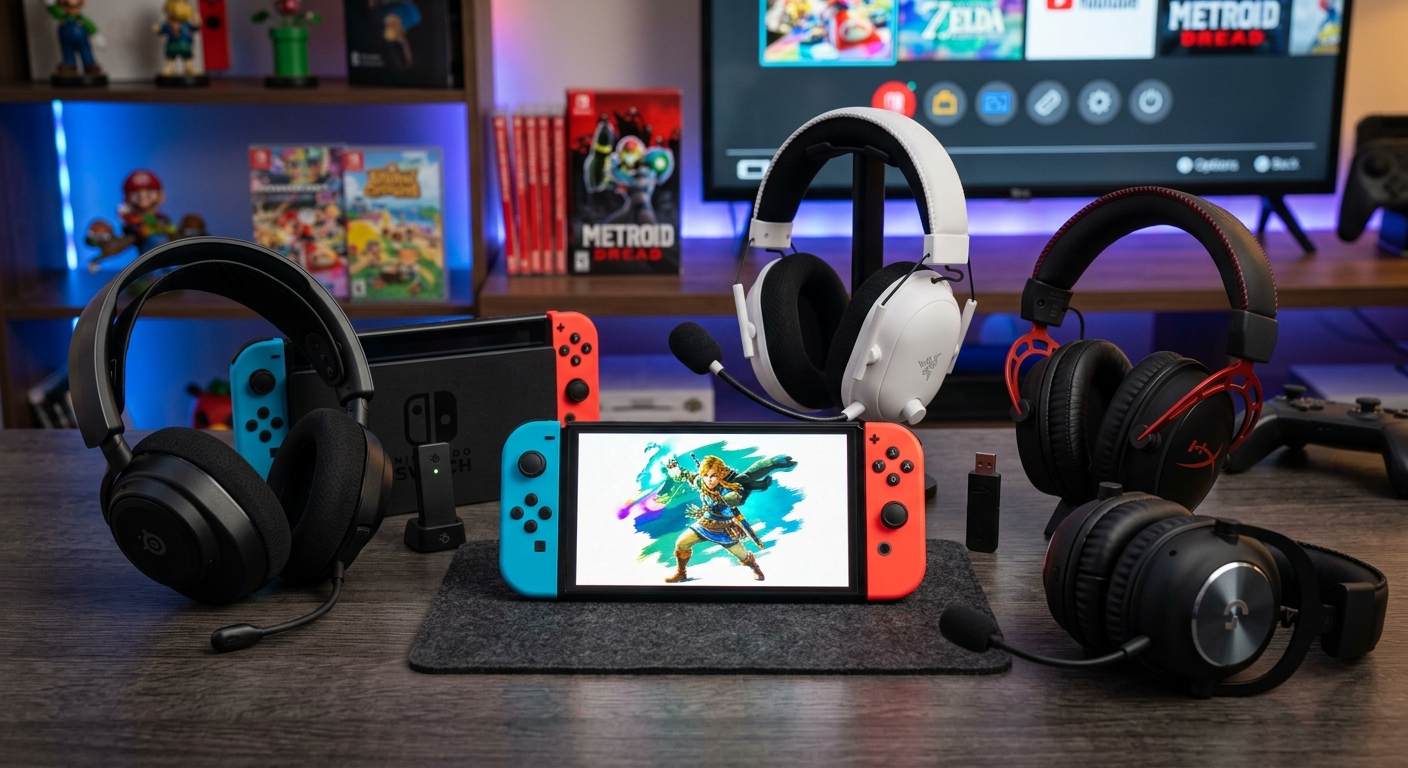
Nintendo Switch consoles, including the newer models with upgraded hardware, support a wide range of gaming headsets. Whether you mainly play in handheld mode on the couch or docked to a TV, choosing the right headset can drastically improve clarity, positional audio, and voice chat. This guide walks through standout Nintendo Switch headsets across prices and use cases, using the original GamesRadar list only as inspiration while delivering fully new analysis, structure, and explanations.
How to Choose a Headset for Nintendo Switch
Before looking at specific models, it helps to know which features matter most on Nintendo’s hybrid console. Unlike some platforms with proprietary wireless standards, the Switch offers:
- 3.5mm analog audio via the console’s headphone jack
- USB and USB-C audio in the dock (and on newer systems directly)
- Bluetooth audio support via system firmware updates
That flexibility means many PC and console headsets will work, but not every feature translates perfectly. Focus on the following criteria when narrowing your options.
Core Buying Factors
- Connection type: Decide between wired 3.5mm, USB-C dongle, or Bluetooth. Wired typically offers the least latency and no battery concerns. USB dongles can deliver low-latency wireless. Bluetooth is convenient but can add delay.
- Comfort for long sessions: Look for generous padding, low clamping force, and headsets in the 250–330 g range for most people. The World Health Organization notes that extended listening sessions at moderate volumes are generally safe if rest periods are included, so comfort directly influences how long you can play responsibly.1
- Microphone quality: Switch voice chat often relies on smartphone apps, but you may still need clear communication for in-game chat on some titles or cross-platform play.
- Cross-platform compatibility: With many players owning multiple systems, a headset that works on Switch, PC, and other consoles offers better long-term value.
- Battery life (wireless): For wireless models, check battery estimates and whether you can also use them in wired mode if power runs low.
Audio Considerations for Mobile Gaming
Unlike a home theater system, a gaming headset sits directly on your ears and can easily reach damaging sound levels if you aren’t careful. The World Health Organization suggests keeping personal listening devices below roughly 80 dB for up to 40 hours per week, with louder listening requiring shorter durations.1 Look for headsets with clear audio at moderate volumes so you don’t feel compelled to max out the volume during handheld play on noisy commutes.
Best Overall Nintendo Switch Headset
Some headsets stand out because they balance audio, comfort, wireless flexibility, and features that fit portable and docked play. These are often premium models, but they can replace multiple devices and last across console generations.
Premium All-Rounder for Switch and Beyond
A flagship wireless headset with a dedicated USB-C or USB-A dongle tends to offer the best experience for Switch players who want performance without compromise. The star features to look for include:
- Low-latency 2.4 GHz wireless via dongle for docked play
- Bluetooth for portable use with Switch, phones, and laptops
- Simultaneous connections, so you can hear game audio while listening to voice chat on another device
- Strong software support on PC for fine-tuning EQ, mic gain, and sound presets
When a headset supports separate wireless and Bluetooth channels, you can, for example, connect the 2.4 GHz dongle to the dock while pairing your phone over Bluetooth for Nintendo Switch Online voice chat. This mirrors the multi-device audio workflows common in modern gaming setups.
| Feature | Why It Matters on Switch |
|---|---|
| 2.4 GHz wireless dongle | Low latency audio for docked mode and TV play |
| Bluetooth 5.x | Portable play in handheld mode without cables |
| Detachable or retractable mic | Transforms into casual headphones for travel |
| On-headset controls | Quick volume, mute, and chat mix adjustments |
| Strong battery life | Reduces charging during long gaming sessions |
Best Wireless Headsets for Switch
Wireless headsets are especially convenient for Nintendo Switch, since players often move between docked play on a TV and portable sessions around the house. However, you need to balance signal reliability and delay. According to tests by outlets such as Tom’s Hardware, 2.4 GHz dongle-based wireless solutions typically provide lower latency than standard Bluetooth audio, which can translate to better sync between picture and sound in fast-paced games.2
Why 2.4 GHz Wireless Still Beats Bluetooth
- Latency: Dongles using proprietary 2.4 GHz links are optimized for gaming and often deliver significantly lower delay than typical Bluetooth codecs.
- Stability: Dedicated receivers are less likely to compete with multiple Bluetooth devices in busy environments.
- Compatibility: A single dongle can support PCs, consoles, and Switch (via USB-A or USB-C) without relying on firmware-based Bluetooth audio implementations.
Budget-Friendly Wireless Picks
If you want wireless freedom without paying flagship prices, look for:
- USB-C dongles that plug directly into handheld systems or Switch docks
- Decent 20–30 hour battery life to cover several days of gaming
- Simple controls for volume and mic mute without complicated software
These mid-range models usually skip advanced features like ANC (active noise cancellation) or high-end materials, but they still provide a big comfort upgrade over bare-bones earbuds.
Top Wired Headsets for Nintendo Switch
Wired headsets remain the most straightforward option for Nintendo Switch. You plug them into the 3.5mm jack and you’re done—no dongles, pairing, or charging. This simplicity is attractive for younger players, travel, and households that prioritize reliability.
Why Wired Still Makes Sense
- No batteries: Wired headsets never run out of power, which is ideal for long trips or days when the console itself is already fighting for charge.
- Universally compatible: Almost any 3.5mm headset will work with the Switch, tablets, laptops, and older controllers.
- Consistent latency: Because the signal is analog or direct digital, delay is essentially negligible for gaming.
Audio engineers and researchers have long highlighted that wired connections provide predictable performance without the compression and potential interference of many wireless links.3 While modern wireless solutions are excellent, a well-made wired headset can still offer superb sound for the price.
Comfort and Build Quality on a Budget
Budget wired models targeted at Switch users often prioritize lightweight designs and flexible mics. When evaluating them:
- Check that the cable is long enough for docked play, but not so long it tangles in handheld mode.
- Look for steel-reinforced headbands or tough plastic that can withstand daily use in backpacks and living rooms.
- Opt for breathable fabric or hybrid earpads to avoid heat buildup during summer sessions.
Great Headsets for Switch 2 and Future-Proofing
Newer Nintendo systems offer improved performance and extended support for USB and Bluetooth, making it worth considering headsets that can grow with you across hardware generations. While exact specifications vary by model, general trends in modern gaming headsets point to:
- Improved USB-C connectivity for controllers, docks, and handheld devices
- Support for newer Bluetooth standards that may reduce latency and improve reliability
- More advanced spatial audio modes tuned for games
Major headset manufacturers typically design their flagship models with multi-year compatibility in mind, providing firmware updates and companion apps to refine features over time. For instance, SteelSeries and other vendors regularly update their software suites to improve microphone processing, EQ presets, and device compatibility across platforms.4
Features That Help Future-Proof Your Purchase
- Firmware update support via PC or mobile apps
- USB-C dongles that include USB-A adapters
- Multi-platform labels (PC, console, mobile) instead of single-platform branding
- Replaceable earpads to extend the lifespan of the headset
Value Picks: Best Budget Headsets for Switch
If your priority is keeping costs under control, there is no shortage of budget wired and wireless options that still deliver solid performance on Nintendo Switch. The key is deciding where to compromise.
Where to Save and Where Not To
- Save on cosmetic extras: RGB lighting and exotic materials look nice but do not affect sound quality or comfort as much as padding and headband design.
- Do not skimp on comfort: Poorly padded or overly tight headsets can cause discomfort, headaches, and pressure points, especially for younger players.
- Accept basic microphones: At lower price points, you’ll usually get functional but not broadcast-caliber mics. As long as teammates can understand you clearly, it’s sufficient.
| Aspect | Budget Headset | Premium Headset |
|---|---|---|
| Connection | Mostly wired 3.5mm | 2.4 GHz + Bluetooth + wired |
| Comfort | Lightweight, basic padding | Advanced cushioning & adjustable clamping |
| Mic quality | Clear enough for chat | Richer, more natural voice capture |
| Features | Volume wheel, mute switch | Chat mix, app control, spatial audio modes |
| Expected lifespan | 2–3 years with careful use | Longer with replaceable parts |
Tips for Getting the Most from Your Switch Headset
Once you’ve chosen a headset, a bit of setup can dramatically improve audio quality and comfort.
Optimize System Settings
- Adjust volume on both the console and headset: If you use a wireless model or inline controls, remember that the console volume and headset dial are separate. Start with the Switch around 60–70% and fine-tune on the headset to avoid clipping and distortion.
- Use EQ presets where available: Many PC apps for headsets let you create custom EQ profiles. Boosting mids can improve clarity for voice-heavy games, while subtle bass enhancement can make action titles more impactful.
- Check chat balance: For headsets with chat–game mix, configure a balance so team communications remain audible during intense sound effects.
Protect Your Hearing
The WHO estimates that over 1 billion young people are at risk of hearing loss due to prolonged exposure to loud sounds, including from personal audio devices.1 To enjoy your gaming sessions without long-term damage:
- Keep volume at the lowest comfortable level where you can still hear details.
- Take short breaks every hour to rest your ears.
- Avoid max volume even in noisy environments; consider closed-back headsets that passively block external sound instead.
Maintenance and Longevity
- Clean earpads regularly: Wipe down pads with a soft, slightly damp cloth and avoid harsh cleaners that could degrade materials.
- Store carefully: When traveling with your Switch, keep headsets in a case or dedicated pocket to prevent cable damage.
- Replace worn pads: Many mid-range and premium headsets allow pad replacement, significantly extending their usable life.
Frequently Asked Questions
Do all gaming headsets work with Nintendo Switch?
Most wired 3.5mm gaming headsets work out of the box with Nintendo Switch using the headphone jack. Wireless models vary: 2.4 GHz dongles usually work if connected to the dock or USB-C port, but some consoles may limit certain advanced functions. Standard Bluetooth audio devices can connect to newer firmware versions of the Switch, though you may notice more latency compared with dongle-based solutions.
Is Bluetooth audio good enough for fast-paced games?
Bluetooth has improved over the years, but many implementations still introduce more delay than 2.4 GHz gaming dongles or wired connections. For slower-paced games or single-player experiences, Bluetooth is often sufficient. For competitive shooters or rhythm games, players who are sensitive to audio delay may prefer low-latency wireless or wired solutions.2,3
Can I use the same headset on Switch, PC, and other consoles?
Yes. Many modern headsets are designed for cross-platform use with multiple cables or wireless modes. Look for models that explicitly list PC and at least one console in their compatibility and include a detachable 3.5mm cable or a USB dongle with both USB-A and USB-C options. This ensures maximum flexibility as you move between devices.
Do I really need a dedicated gaming headset for Switch?
Not necessarily. Any decent pair of wired headphones with a mic can improve the experience over the Switch’s built-in speakers, particularly in handheld mode. However, gaming headsets are tuned for clearer positional audio and communication, offer boom microphones that are easier to position, and often provide more comfortable padding for long sessions. If you play frequently or competitively, a dedicated headset is usually worth the investment.
How loud is too loud when gaming with a headset?
Exact thresholds depend on duration and individual sensitivity, but health organizations broadly advise staying below about 80 dB for long listening periods and taking breaks to prevent hearing fatigue.1 As a rule of thumb, if someone standing at arm’s length can hear sound leaking from your headset clearly, your volume is probably too high.
References
- Make Listening Safe — World Health Organization. 2019-03-01. https://www.who.int/activities/making-listening-safe
- Best Gaming Headsets 2024: Our Tested Picks for Comfort and Audio — Tom’s Hardware. 2024-02-15. https://www.tomshardware.com/peripherals/gaming-headsets/best-gaming-headsets
- Audio Latency: How Low Can We Go? — Audio Engineering Society (AES E-Library). 2018-10-01. https://aes.org/e-lib/browse.cfm?elib=19780
- SteelSeries GG Software Overview — SteelSeries. 2023-11-10. https://steelseries.com/gg
Similar Articles




Read full bio of medha deb