Build the Ultimate Cozy Gaming Setup This Winter
Transform your gaming corner into a warm, comfortable retreat with smart hardware choices, soft lighting, and comfort-first accessories.
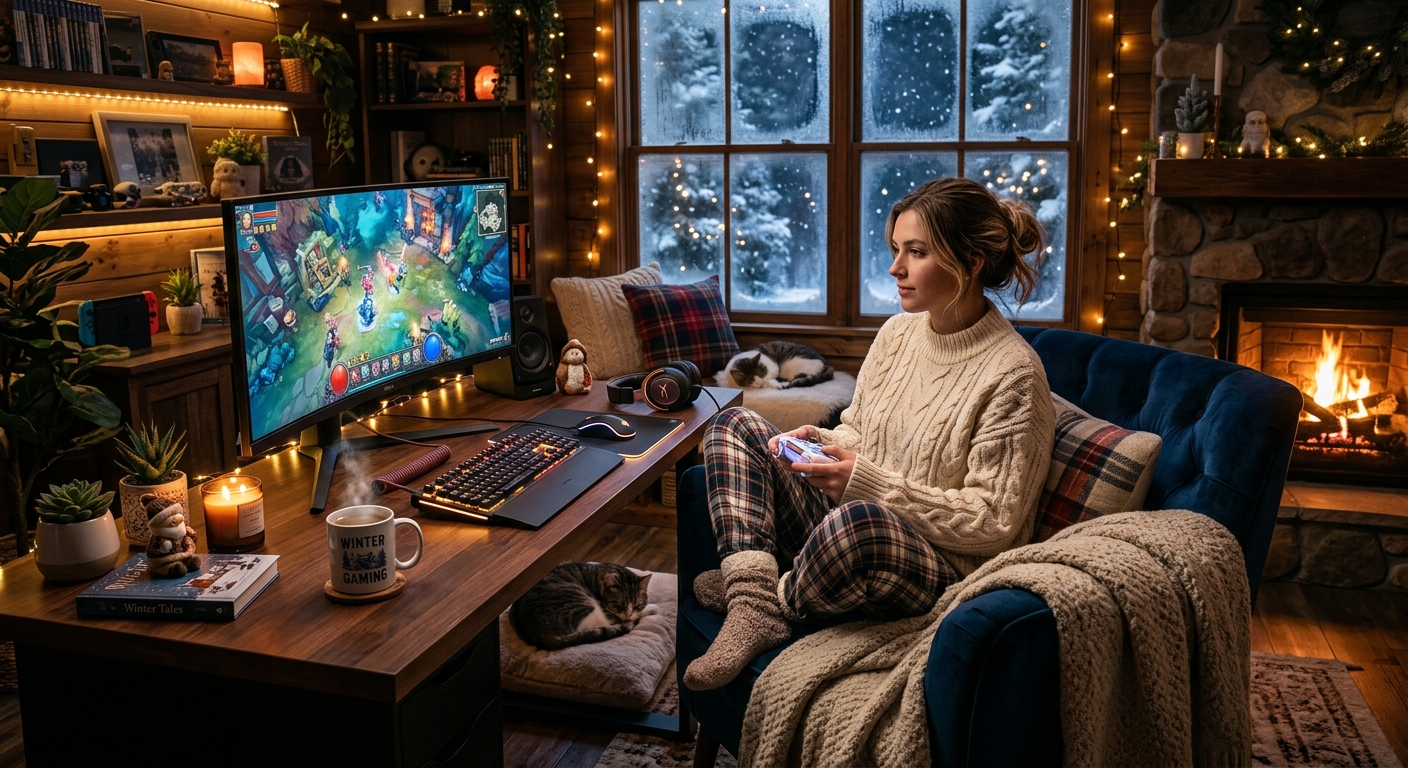
Winter is the perfect excuse to lean into long, relaxing gaming sessions. Shorter days, colder nights, and more time indoors create an ideal backdrop for a space that feels warm, inviting, and comfortable. A truly cozy gaming setup blends good hardware with the right atmosphere so you can unwind without sacrificing performance.
This guide walks you through every element of a winter-friendly gaming corner: display choices, seating, lighting, audio, comfort accessories, and small details that make the difference between a basic desk and a sanctuary you never want to leave.
Understanding What Makes a Gaming Setup “Cozy”
Cozy is more than a blanket and a mug of hot chocolate near your controller. It’s a combination of physical comfort, visual warmth, and sensory balance. Your setup should reduce strain, lower distractions, and create a feeling of safety and calm.
Key ingredients of a cozy gaming space include:
- Ergonomic comfort – A chair, desk height, and display arrangement that support your body.
- Soft, warm lighting – Avoiding harsh glare and stark contrasts between screen and room.
- Controlled sound – Immersive audio that doesn’t overwhelm or disturb others.
- Warm textures – Fabrics, cushions, and surfaces that feel inviting to touch.
- Personal touches – Decor that reflects your tastes without cluttering the space.
When these elements work together, you can play for hours without eye strain, back pain, or sensory overload.
Planning Your Cozy Gaming Layout
Before buying new gear, look at the room or corner where you play. A good layout helps your hardware and comfort upgrades shine.
Choosing and Positioning Your Desk
Your desk is the foundation of the entire setup. For winter gaming, prioritize stability and enough surface area for both tech and comfort items.
- Depth and width: Aim for enough depth so your monitor can sit at roughly an arm’s length away and still leave space for your keyboard, controller, and a wrist rest.
- Surface finish: Matte or textured surfaces reduce glare from desk lamps and screens.
- Cable management: Use grommets, trays, or simple clips to route cables away from your legs and keep the visual noise down.
Placing the desk near a wall allows you to use that wall for soft backlighting, shelves, or wall art, all of which add to a sense of enclosure and coziness.
Ergonomic Positioning for Long Sessions
Health guidance from clinics and ergonomics experts suggests keeping your monitor at, or slightly below, eye level with the top of the screen aligned with your eyes and at about an arm’s length away to reduce neck and eye strain.1,2 Think of your layout as a triangle: eyes, hands, and back should be supported together.
- Monitor height: Use a stand or arm to raise the screen so you aren’t repeatedly tilting your head.
- Keyboard and mouse distance: Your elbows should rest near a 90-degree angle, with wrists neutral.
- Chair and desk height: Adjust so your feet are flat on the floor (or a footrest) and your thighs are roughly parallel to the ground.
Display Choices for Comfort and Immersion
Your monitor or TV is the visual center of your cozy build. In winter, you’re likely to play more in the dark, so choosing a display that can be comfortable at lower brightness is essential.
Monitor Features That Enhance Comfort
Modern displays often include eye comfort features designed to lower strain during long sessions. Official health organizations and clinical guidance emphasize reducing glare, limiting high-contrast situations, and using appropriate brightness to minimize eye fatigue.2,3
Look for:
- Adjustable brightness and color temperature: A warm, slightly dimmer profile is easier on your eyes at night.
- High refresh rate: Smoother motion can feel more comfortable and less tiring in fast games.
- Flicker-free backlighting: Helps reduce subtle eye strain during hours-long sessions.
- Anti-glare coating: Useful when playing in a room with lamps or windows behind you.
Monitor Accessories for a Cozy Feel
A few simple add-ons can dramatically change how your display feels in a dark room.
- Monitor light bar: A slim lamp that sits on top of the monitor and throws light onto the desk, reducing contrast between the bright screen and dark surroundings.
- Bias lighting (backlighting): LED strips behind the display create a halo that eases eye strain and makes the image appear richer.
- Matte screen protector (if needed): Can help if you can’t control reflections from nearby lamps.
Seating: The Heart of a Cozy Setup
You can’t be cozy if your back hurts. A good chair and support system make a bigger difference than most new gadgets.
Choosing a Comfortable Gaming or Office Chair
Research-backed ergonomic recommendations emphasize lumbar support, adjustability, and seat depth as key to comfort over time.1,4 When comparing options, keep these points in mind:
- Lumbar support: Look for adjustable or built-in support that follows the natural curve of your lower back.
- Adjustable armrests: Height and angle adjustments help keep your shoulders relaxed and wrists aligned.
- Seat cushioning: Medium-firm foam or breathable materials are ideal. Too soft feels nice initially but may cause fatigue.
- Tilt and recline: A rocking or recline function lets you change posture during long sessions, reducing stiffness.
Soft Additions: Cushions, Throws, and Footrests
Once you have a supportive chair, layer in warmth and softness:
- Seat cushion: A memory foam cushion can add comfort and slightly raise your sitting height if needed.
- Lumbar pillow: Even with built-in support, a small pillow can fine-tune the fit.
- Throw blanket: Keep a lightweight blanket nearby for winter nights; choose a fabric that doesn’t shed onto your peripherals.
- Footrest: A simple footrest or even a plush ottoman keeps your legs supported and helps with circulation.
Lighting: Warm, Layered, and Easy on the Eyes
Lighting is where a normal gaming corner transforms into a cozy retreat. Good lighting is not just aesthetic; it also supports your visual comfort and sleep schedule.
Balancing Screen Light and Room Light
Staring at a bright screen in a pitch-dark room is one of the fastest ways to strain your eyes. Vision health guidance recommends having some ambient light in the room to reduce contrast and glare.2,3 Think in layers:
- Ambient light: A floor lamp or ceiling fixture with a warm bulb to softly light the room.
- Task light: A desk lamp with a diffused shade for reading, notes, or crafting between matches.
- Accent light: LEDs behind the monitor, under shelves, or along the wall to set the mood.
Color Temperature and Bulb Choices
Warm color temperatures (around 2700K–3000K) create the classic cozy glow associated with evening light, while cooler settings are better for alert daytime work.3
| Color Temperature | Appearance | Best Use in Setup |
|---|---|---|
| 2700K–3000K | Warm, yellowish | Evening ambient light, accent lamps, cozy glow |
| 3500K–4000K | Neutral white | Task lighting for reading or daytime desk work |
| 5000K+ | Cool, bluish | Not ideal for cozy winter gaming; can feel harsh |
Smart bulbs or LED strips let you adjust color and brightness on the fly, so you can move from focused competitive matches to laid-back cozy sessions without changing hardware.
Audio: Soft, Immersive, and Neighbor-Friendly
Sound is a big part of comfort. You want to feel wrapped in the game’s audio without blasting the entire house.
Choosing the Right Audio Gear
- Closed-back headphones: Great for blocking outside noise and keeping sound in. Pair them with a soft headband and breathable ear cushions for long sessions.
- Open-back headphones: More natural soundstage and less ear fatigue, but sound leaks out, so they’re better if you have a private room.
- Compact speakers and soundbars: Ideal when you want a break from wearing headphones. Place them so the sound is directed toward you, not the wall.
Audio Comfort Tips
Following general hearing health guidance, it’s wise to keep volume at a moderate level and take listening breaks across long gaming sessions.5
- Keep your system’s volume under roughly 60–70% of maximum.
- Take short breaks after every few matches to give your ears and mind a reset.
- Use built-in equalizer settings to lower harsh highs and boost mellow mid-tones for a softer, cozier sound profile.
Comfort Accessories That Complete the Space
Once the big pieces are in place, smaller items elevate your setup from “functional” to “can’t-wait-to-go-home-and-play.”
Textiles and Surfaces
- Rug: A soft rug under your desk warms the floor and dampens sound, especially in rooms with hard flooring.
- Desk mat: A large, smooth mat protects your desk and gives your mouse, keyboard, and hands a comfortable surface.
- Wrist rests: Cushioned rests for keyboard and mouse help keep wrists in a neutral position.
Warmth and Seasonal Comfort
- Space heater (used safely): If your room runs cold, a small heater placed at a safe distance can make winter sessions far more pleasant. Keep it away from cables, curtains, and never leave it unattended, in line with typical electrical safety advice.6
- Hand warmers or fingerless gloves: Keep your hands nimble without sacrificing control of the mouse or controller.
- Insulated mug or bottle: Hot drinks stay warm longer, and closed lids reduce the risk of spills near electronics.
Organization and Clutter Control
A cozy space feels calm, not chaotic. A few organizing tools can keep things tidy:
- Controller stands or charging docks: Combine storage and charging so your controllers always have a home.
- Headphone stand or hook: Prevents headsets from cluttering your desk.
- Small storage baskets: Hide cables, remotes, and spare accessories out of sight but within reach.
Personalizing Your Winter Gaming Sanctuary
Personal touches transform a good setup into your setup. The goal is to express your tastes while preserving visual calm.
Decor That Adds Warmth Without Overload
- Plants: Real or high-quality artificial plants add life and color. Place them where they don’t block screens or vents.
- Artwork and posters: Choose a color palette that complements your lighting rather than competing with it.
- Collectibles and figures: Display a few favorites on a shelf or stand instead of crowding the entire desk.
Color Palettes for a Cozy Feel
Neutral and warm tones tend to feel more relaxing than high-contrast, neon-heavy setups. Consider:
- Soft whites, creams, and light grays for the main background.
- Accents in muted blues, greens, or terracotta.
- Warm metallic touches (copper, brass) in lamp bases or frames.
Pair your palette with lighting that flatters those colors, and your entire setup will feel cohesive and intentional.
Quick Cozy Gaming Setup Checklist
Use this checklist as a reference when building or upgrading your winter setup:
- Desk positioned to allow an arm’s-length viewing distance.
- Monitor at or slightly below eye level, with bias lighting or a light bar.
- Chair with lumbar support, adjustable height, and comfortable cushions.
- Warm, layered lighting: ambient, task, and accent sources.
- Headphones or speakers tuned to a gentle, immersive sound.
- Rug, desk mat, cushions, and throw blanket for tactile warmth.
- Safe, efficient heating if your room is cold.
- Organized storage for controllers, headsets, and accessories.
- Personal decor that reflects your tastes but avoids clutter.
Frequently Asked Questions
How bright should my room be when gaming at night?
Aim for soft ambient light that reduces the contrast between the screen and the room. The space should be dim but not dark; you should be able to see objects in the room without straining. A floor lamp in a corner plus a monitor light bar or bias lighting is usually enough.
Is a gaming chair better than an office chair for a cozy setup?
It depends more on ergonomics than branding. Some gaming chairs are supportive; others are mostly aesthetic. Many ergonomic office chairs offer better lumbar support and adjustability. Choose whichever option gives you proper back support, adjustable features, and cushioning that feels good for hours.
How can I make a small room feel cozy without feeling cramped?
Keep furniture to essential pieces, use vertical wall space for decor and storage, and choose a cohesive color palette. Soft, indirect lighting and a tidy desk help a small space feel intentional rather than crowded. Foldable or stowable accessories, like a collapsible footrest, can also save space.
Are LED strips safe to use behind my monitor or desk?
Yes, as long as you follow the manufacturer’s instructions. Use LEDs rated for indoor use, avoid overloading power strips, and keep strips away from heat sources. Properly installed LEDs stay cool and provide excellent ambient lighting with low power consumption.
What’s the most important upgrade if I’m on a tight budget?
If you already have a working display and console or PC, focus on ergonomics and lighting. An inexpensive desk lamp with a warm bulb, a simple lumbar cushion, and a basic desk mat can dramatically increase comfort for relatively little cost. You can then gradually add more specialized gear as your budget allows.
By thoughtfully combining ergonomic hardware, warm lighting, soft textures, and personalized touches, your winter gaming setup can become a place where you feel both energized and relaxed. Whether you’re grinding ranked matches or unwinding with a cozy narrative game, the right environment makes every session more enjoyable.
References
- Computer Workstations eTool: Good Working Positions — Occupational Safety and Health Administration (OSHA). 2019-10-18. https://www.osha.gov/etools/computer-workstations
- Computer Vision Syndrome — American Optometric Association. 2020-01-01. https://www.aoa.org/healthy-eyes/eye-and-vision-conditions/computer-vision-syndrome
- How Lighting Affects Your Eyes — American Academy of Ophthalmology. 2021-10-06. https://www.aao.org/eye-health/tips-prevention/lighting-eye-safety
- Ergonomics and Musculoskeletal Disorders — U.S. Centers for Disease Control and Prevention (CDC). 2021-03-01. https://www.cdc.gov/niosh/topics/ergonomics/default.html
- Noise-Induced Hearing Loss — National Institute on Deafness and Other Communication Disorders (NIDCD). 2023-03-15. https://www.nidcd.nih.gov/health/noise-induced-hearing-loss
- Heating Equipment Safety — National Fire Protection Association (NFPA). 2022-09-01. https://www.nfpa.org/education-and-research/home-fire-safety/heating
Similar Articles








Read full bio of Sneha Tete